viralvibes
🎬 ViralVibes - YouTube Trends, Decoded
Web application that analyzes YouTube playlists to uncover viral trends and engagement patterns. Built with FastHTML and MonsterUI for a modern, responsive interface.


Discover what makes YouTube playlists go viral with AI-powered analytics
Live Example: https://www.viralvibes.fyi
Features
- 🔍 Analyze any YouTube playlist for viral trends
- 📊 View detailed engagement metrics and statistics
- 🎯 Calculate engagement rates and performance indicators
- 📱 Responsive design with modern UI components
- 🔒 Secure newsletter signup with Supabase integration
Technology Stack
Frontend
- FastHTML – Server-side HTML rendering framework
- MonsterUI – UI component library
- TailwindCSS – Utility-first CSS framework
- HTMX – For real-time updates and client-driven interactivity
Backend & Data Processing
- Python – Core language
- yt-dlp – Tool for retrieving YouTube data
- Polars – Fast DataFrame library for data manipulation
- Supabase – Used for user data, analytics, and storage
Deployment
- Vercel – Platform used for deployment; supports one-click deploy or CLI usage via
vercel --prod
Getting Started
- Clone the repository:
git clone https://github.com/navneeth/viralvibes.git cd viralvibes - Install dependencies:
uv venv --python 3.11.6 source .venv/bin/activate uv pip install -r requirements.txt - Set up environment variables:
cp .env.example .env # Edit .env with your Supabase credentials - Run locally:
python main.pyThe development server will start at http://0.0.0.0:5001
Python Version Management
This project uses standard OSS practices for Python version management:
pyproject.toml- Single source of truth (requires-python = ">=3.11").python-version- Used by pyenv and GitHub Actionsruntime.txt- Vercel deployment only
All GitHub Actions workflows read from .python-version using python-version-file parameter.
CLI Usage
ViralVibes includes a CLI tool for local development and debugging. Here are the main commands:
Process Individual Playlists
Test playlist processing with either backend:
# Local debug with yt-dlp backend
python cli.py process "https://youtube.com/playlist?list=PLxxxxx" --backend yt-dlp

# Local test with YouTube API backend
python cli.py process "https://youtube.com/playlist?list=PLxxxxx" --backend youtubeapi
Additional CLI options:
--dry-run: Run without updating the database--help: Show all available options
Worker Commands
# List pending jobs
python cli.py pending

# Run the worker loop (like on Render)
python cli.py run --poll-interval 10 --batch-size 3 --max-runtime 300
Architecture
The application follows a modern serverless architecture with three main layers:
Mental Model (Directory Structure)
components/→ UI primitives (buttons, cards, tables, sections)views/→ Composed pages (dashboard views, layouts)services/→ YouTube + data logic (playlist processing, transforms)worker/→ Async jobs (background processing, job queue)routes/→ Entry points (partially used, mostly in main.py)tests/→ Solid coverage (unit and integration tests)
Frontend Layer
- FastHTML for server-side rendering
- MonsterUI components for modern UI
- Responsive design with TailwindCSS
- Real-time updates with HTMX
Backend Layer
- Python-based API endpoints
- YouTube data processing with yt-dlp
- Polars for efficient data manipulation
- Supabase integration for data storage
Data Layer
- Supabase for user data and analytics
- Real-time data processing
- Secure data storage
- Efficient caching mechanisms
Key Files and Responsibilities
- youtube_service.YoutubePlaylistService: Core service for handling YouTube playlist data retrieval and processing, located in the
servicespackage due to its heavy logic. - worker.py: Manages the job loop, handles job processing, and interacts with the database for task scheduling and execution.
- db.py: Contains Supabase helper functions for database operations, including caching and upsert mechanisms.
- components.py: Defines MonsterUI components for building the application’s user interface.
- main.py: Handles web requests and composes the UI using FastHTML for server-side rendering.
- tests/: Directory containing test suites with good coverage, though dependent on global environment and configuration settings.
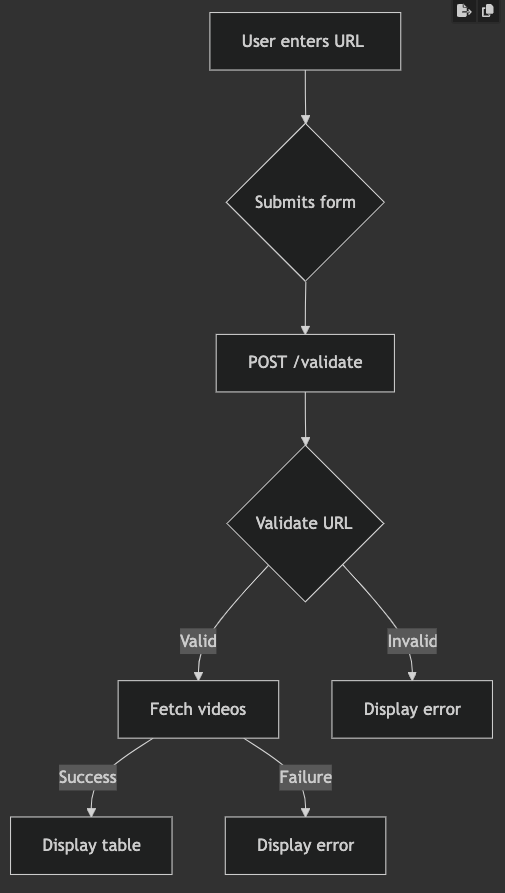
graph TD
    A[Frontend - main.py] -->|POST /validate| B[YouTube Service - services/youtube_service.py]
    B -->|Compute metrics| C[Database Layer - db.py]
    C -->|Upsert playlist stats| D[Supabase/Postgres]
    D -->|Trigger job state update| E[Worker - worker/worker.py]
    E -->|Fetch & process playlist| B
    E -->|Write job status| C
    F[Tests] -->|Validate| A & B & E
DataFrame schema (expected columns)
The YouTube service returns a Polars DataFrame with the canonical columns below. Code expects these exact names and types when reading/processing playlist results.
| Column | Type | Description |
|---|---|---|
| Rank | int64 | Position in playlist (1-based) |
| id | string | YouTube video ID (e.g. dQw4w9WgXcQ) |
| Title | string | Video title |
| Description | string | Video description |
| Views | int64 | View count |
| Likes | int64 | Like count |
| Dislikes | int64 | Always 0 (YouTube API no longer returns dislikes) |
| Comments | int64 | Comment count |
| Duration | int64 | Duration in seconds |
| PublishedAt | string | ISO publish date (e.g. 2023-05-12T15:30:00Z) |
| Uploader | string | Channel name |
| Thumbnail | string | URL to high-res thumbnail |
| Tags | list[string] | List of tags |
| CategoryId | string | YouTube category ID |
| CategoryName | string | Human-readable category (e.g. Music) |
| Caption | boolean | True if captions/subtitles exist |
| Licensed | boolean | True if licensed content |
| Definition | string | hd or sd |
| Dimension | string | 2d or 3d |
| Rating | float64 | Reserved / typically null |
Place this section near “Key Files and Responsibilities” or under the “Data Layer” section so it’s visible to contributors and tests.
Class diagram for DataFrame normalization and enrichment changes
classDiagram
    class YouTubeDataFrame {
        +Rank: int64
        +id: string
        +Title: string
        +Description: string
        +Views: int64
        +Likes: int64
        +Dislikes: int64
        +Comments: int64
        +Duration: int64
        +PublishedAt: string
        +Uploader: string
        +Thumbnail: string
        +Tags: list[string]
        +CategoryId: string
        +CategoryName: string
        +Caption: bool
        +Licensed: bool
        +Definition: string
        +Dimension: string
        +Rating: float64
        +Controversy: float64
        +Engagement Rate Raw: float64
        +Views Formatted: string
        +Likes Formatted: string
        +Dislikes Formatted: string
        +Comments Formatted: string
        +Duration Formatted: string
        +Controversy %: string
        +Engagement Rate (%): string
    }
    class YouTubeTransforms {
        +normalize_columns(df: DataFrame): DataFrame
        +_enrich_dataframe(df: DataFrame, actual_playlist_count: int): (DataFrame, Dict)
    }
    YouTubeTransforms --> YouTubeDataFrame : returns/operates on
Deployment
Deploy to Vercel with one click using the button above, or use the CLI:
npm install -g vercel
vercel --prod
Contributing
Contributions are welcome! Fork the repository, open a branch, and submit a PR.
License
This project is licensed under the MIT License - see the LICENSE file for details.
Acknowledgments
- FastHTML for the web framework
- MonsterUI for UI components
- Supabase for backend services
- Vercel for deployment
Pre-commit hooks
This repository uses pre-commit to run linters and formatters locally before commits.
Quick setup (run once after cloning):
pip install pre-commit
pre-commit install
Run all hooks against the repository (useful for CI or one-time fixes):
pre-commit run --all-files
Notes
- The hook configuration lives in
.pre-commit-config.yamlat the repo root. - Common hooks include formatters and linters (e.g., black/isort/ruff/mypy), plus basic checks (trailing-whitespace, end-of-file-fixer).
- In CI, run
pre-commit run --all-filesto ensure code meets the repo hooks before merging.
🧪 Testing & Coverage
# Run tests with coverage
coverage run -m pytest tests/ -v
coverage report

# View HTML report
coverage html && open htmlcov/index.html
Current Coverage: